




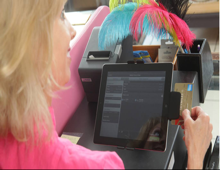
 An iPad based Point of Sale (POS) terminal uses an iPad application that allows you to do your business practically anywhere. With an iPad POS, you can sell your products or service to customers at a pop-up setting or in a brick-and-mortar store. You can process orders and accept payments, even electronic payments, all using your iPad. With an iPad POS system, you can search your inventory for a specific product, swipe a customer’s credit card and print receipts or send them to customers via email.
Enable Electronic Payment Processing
Some ecommerce platforms offer their own card reader, like Shopify for instance, but other payment gateways require the purchase of an external device to process credit card orders. You can also set up an iPad POS terminal to accept other payment options such as debit cards, split tenders and partial payment processing.
An All-In-One POS Solution
With an iPad POS terminal, you have the power of cloud computing to keep your business in sync from managing your customers and handling orders to keeping track of both your offline and online inventory. And you can do all this from a single terminal. A good solutions provider will be able to supply you with the complete POS hardware and software you will need to get stared. This type of POS system is designed to be easy, so setting it up should be that simple.
Finding the Right Hardware
First of all, the right hardware must be compatible with your POS system. If it’s time to upgrade to an iPad POS terminal, you may need a number of devices and accessories to complete your set up. An iPad-based POS terminal can include all or a few of the following hardware.
- Cash drawer: Keep cash safe in a lockable and heavy duty cash drawer. This drawer can be opened with keys or wirelessly via a secure iPad app.
- iPad stand: A mounting device that is lightweight for easy transport but durable and robust to keep your iPad safe from theft and secure. It can be attached with a pivoting accessory to make it easy to rotate or turn.
- Encrypted card reader: Enables secure credit card processing. Captures signatures via the touchscreen and stores customer data digitally.
- Receipt printer: Allows custom receipts to be printed wirelessly, if the customer does not prefer to receive receipts via email.
Run Your Store the Easy Way
An iPad POS makes it incredibly easy to manage your store. Right from your iPad, you can browse your product catalog, show customers the newest items in your inventory, make a sale, accept card payment and print receipts. The entire selling process can be completed with a touch and swipe of a screen, and best of all you can sell not only in your own store but practically anywhere—fairs, trade shows, exhibits and markets.
Sync Data Automatically
When you use an iPad POS terminal in your brick-and-mortar retail store, all your inventory, customer information and orders will be synced with your ecommerce store. Manage multiple stores and track sales from a single dashboard, whether they are made online on in your retail location. You can also unify your payment systems and all transactions. The ability to automatically sync data across your retail operations means you can forget about maintaining separate inventories, product lists or catalogs. This frees up a huge time resource for you or your managers, which can be spent on operations or business development. The software that powers your iPad POS system will integrate every aspect of your business and make accurate and timely data accessible to you in one simple platform.
Get Valuable Data about Your Business
Every business decision requires solid data, which must be gathered and analyzed carefully in order to be useful in the decision-making process. An excellent iPad POS terminal serves more than just a payment processor. The right system can also work as a powerful data gathering and reporting tool, tracking customers and every sales processed at all locations that use the terminal. With a few clicks of your mouse, you can view all your business metrics from the terminal and see transactions as they take place.
Track All Your Accounts With Personal Capital
 Personal Capital lets you see all of your accounts in one convenient place. Sign up now for free.
Some POS solutions are even able to provide comprehensive reports to businesses about their retail operations, along with data analytics to equip business owners with the information they need to make important business decisions. Data tracking and reporting capabilities also enable a business to spot current and emerging trends in customer preferences and gain crucial insight into the market and customer shopping behavior.
Leave a Reply